Manage Attendance Using E Shikshakosh Portal for Teachers
Manage Attendance Using E-Shikshakosh Portal for Teachers managing attendance efficiently is essential for both educational institutions and teachers. Traditional manual attendance systems, often plagued with delays, errors, and inefficiencies, are slowly being replaced by more streamlined, digital methods. One such method gaining prominence in Bihar’s schools is the E-Shikshakosh portal. Launched by the Bihar Education Project Council (BEPC), this digital platform helps teachers, administrators, and officials handle school data, including attendance, more effectively. The shift to this modern system has made the attendance process quicker, more transparent, and more accessible to both educators and students.
For teachers, managing attendance through the E-Shikshakosh portal can drastically reduce the time spent on administrative tasks, allowing more time for teaching. This complete guide will walk you through how to manage attendance on the portal, ensuring accuracy and efficiency.
E Shikshakosh Portal
E Shikshakosh Teacher Training Improving Education in Bihar portal is a comprehensive digital platform designed to manage various school operations, including attendance, teacher records, transfers, and performance monitoring. It’s an essential tool for all educational staff in Bihar, from teachers to administrators, providing a centralized system for accessing and updating real-time information.
Through the portal, teachers can mark student attendance on a daily basis, view historical data, and track overall student participation. This system replaces manual attendance registers, saving time and improving data accuracy. Teachers can use the portal via both the web interface and a mobile app, making it accessible from anywhere.
Manage Attendance Using E Shikshakosh Portal
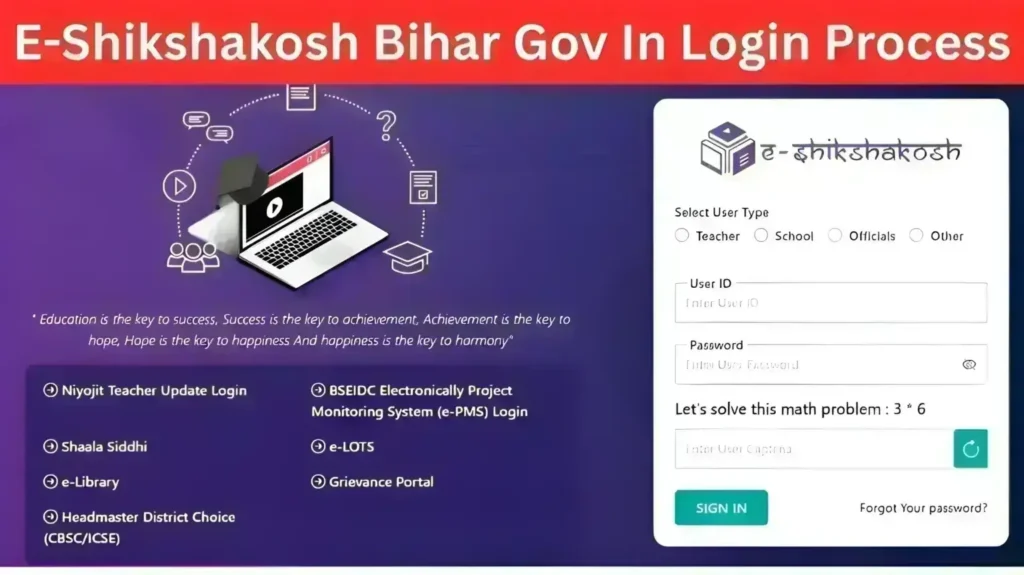
Access the Portal: Visit the official E-Shikshakosh portal website or download the mobile app from Google Play Store (for Android devices) or the App Store (for iOS).
Enter Credentials: Use your teacher ID and password provided by the Bihar Education Department to log into the system. If you’re a new user, the school administration should provide you with these details.
Dashboard: Once logged in, you’ll be taken to the main dashboard, where you can manage your attendance, school assignments, and other administrative tasks.
Marking Daily Attendance
Select the Class: From the dashboard, select the class you are teaching.
View the Student List: The portal will display a list of students enrolled in your class. Each student’s name will appear along with options to mark their attendance.
Mark Attendance: For each student, you can mark attendance as Present, Absent, or Leave. You can also record the reason for absence if applicable.
Submit Attendance: After reviewing the list and making the necessary changes, click on the Submit button to record the attendance for that day.
Using the Mobile App for Attendance
Open the App: Download the E-Shikshakosh app from Google Play or App Store and open it on your device.
Log In: Enter your teacher credentials (ID and password).
Select Your Class: Choose the class you’re teaching from the list.
Mark Attendance: Tap on each student’s name to mark them as Present, Absent, or on Leave.
Viewing Attendance History
Go to the Attendance Section: From the dashboard, select the Attendance section.
Select a Date Range: Choose the desired period (week, month, or specific dates) to view past attendance records.
Review Attendance: The portal will display all attendance data for the selected period, allowing you to track patterns or identify students with recurring absences.
Handling Leave Requests
Record Leave: If a student submits a leave request, you can mark them as Leave on the system. You can also enter the reason for the leave, such as illness or family matters.
Approval Process: Depending on the school’s policy, leave requests may need approval from the headmaster or administrative staff. The portal can handle this approval process digitally, reducing delays.
Attendance Reports for Administrators
Generate Reports: Administrators can pull detailed reports about class attendance, student attendance patterns, and overall school attendance.
Analyze Trends: The system’s analytics tools allow them to identify trends such as frequent absenteeism or low attendance rates. These insights can inform decisions about student interventions or resource allocation.
Benefits of Using the E Shikshakosh Portal for Attendance Management
Time Efficiency: Teachers no longer need to manually track attendance or fill out forms. The system automates this process, saving significant time.
Accuracy: Digital attendance eliminates the risk of human error, making records more reliable and easier to track.
Real-Time Updates: Attendance data is updated immediately, allowing for quick action if necessary (e.g., notifying parents of repeated absences).
Transparency: Real-time updates ensure that school officials and parents can monitor attendance regularly, ensuring greater accountability.
FAQs
Final Words
Managing attendance using the E-Shikshakosh portal represents a significant leap forward in simplifying administrative tasks for teachers and enhancing school efficiency. The platform’s user-friendly design, accessibility via both mobile and web applications, and real-time data handling empower teachers to track attendance with greater accuracy and ease. By eliminating the need for paper-based records, teachers can spend less time on manual processes and more time focusing on teaching.
As Bihar continues to digitize its educational infrastructure, platforms like E-Shikshakosh are vital for improving the quality of education and promoting transparency in the system. Teachers who embrace this change will not only streamline their administrative workload but also contribute to the larger goal of creating a modern, efficient, and accessible education system.


